
Our Software Expertise
in Photo & Video Editing
Transform your visuals with our expert editing using Adobe Photoshop, Premiere Pro, DaVinci Resolve, and more.

What Our Editing Services Can Do for You?
At Innovature Studio, we provide tailored photo and video editing services for businesses, content creators, and individuals. From retouching e-commerce product photos to crafting cinematic video content, our team uses industry-leading software to deliver high-quality results.
We support projects like real estate visuals, marketing campaigns, social media content, and more, with flexible outsourcing options for seamless collaboration. Pricing starts at just $0.49 per image for photo editing services and $20.65 per video for video editing services.

Software We Use for Video Editing

Adobe Premiere Pro
A leading video editing platform for seamless cuts, transitions, and multi-track projects. Use it for producing YouTube videos, corporate promos, or short films. Essential for content creators, marketing agencies, and filmmakers needing professional-grade edits.
Adobe After Effects
The go-to for motion graphics, visual effects, and compositing, adding dynamic animations to videos. Use it for creating engaging intros, animated ads, or VFX-heavy projects. Ideal for brands, animators, and video editors aiming for cinematic polish.
DaVinci Resolve
A powerhouse for video editing and advanced color grading, with a robust free version. Use it for cinematic color correction, music videos, or film projects. Suited for filmmakers, YouTubers, and studios seeking vibrant, professional visuals.

Final Cut Pro
A Mac-optimized editing suite with an intuitive interface for fast, high-performance video editing. Use it for corporate videos, documentaries, or social media content. Perfect for Mac-based editors, agencies, and creators prioritizing speed and quality.

Wondershare Filmora
Filmora is user-friendly and budget-conscious, perfect for brands needing quick, polished videos. Built-in effects and templates help maintain consistent branding, even for teams with limited editing experience.
Movavi Video Editor
With a simple drag-and-drop interface, Movavi empowers brands to rapidly produce branded content, ideal for social media and fast-paced campaigns.

Lightworks
Lightworks provides robust editing tools suitable for everything from basic brand videos to advanced film projects, giving brands flexibility and scalability.
Corel VideoStudio Pro
Feature-rich and affordable, Corel VideoStudio Pro supports 4K and 360-degree video, making it ideal for creative, immersive marketing campaigns. Brands benefit from its versatility and ease of use.
Software We Use for Photo Editing

Adobe Photoshop
We use Adobe Photoshop for precise retouching and creative compositing, ideal for e-commerce product images, marketing banners, and branded graphics. Its advanced tools help us adjust lighting, remove backgrounds, and enhance details, ensuring high-quality visuals for businesses and content creators.

Adobe Lightroom
Adobe Lightroom streamlines our photo editing with non-destructive tools for color correction and organization. We use it for real estate photography, portrait batches, and social media content, delivering consistent, polished images quickly for clients needing efficient workflows and vibrant results.
Affinity Photo
Affinity Photo supports our editing needs with robust tools for retouching and graphic design. We use it for social media visuals, marketing materials, and photo restorations, offering cost-effective solutions for small businesses and startups seeking professional-grade imagery.

GIMP
GIMP is a free editing tool, powers our budget-friendly projects like blog graphics, event photos, and non-profit visuals. Its flexible features allow us to adjust colors, retouch images, and create custom designs, meeting client needs without compromising quality.
Our Services
Explore our photo and video services for e-commerce, real estate, and marketing projects.

Beauty Products
- Photo Retouching
- Color Correction
- Background Removal
- Image Cropping
- Batch Editing


Clothing and Fashion
- Ghost Mannequin Effect
- Color Correction
- Retouching
- Background Removal
- Image Cropping
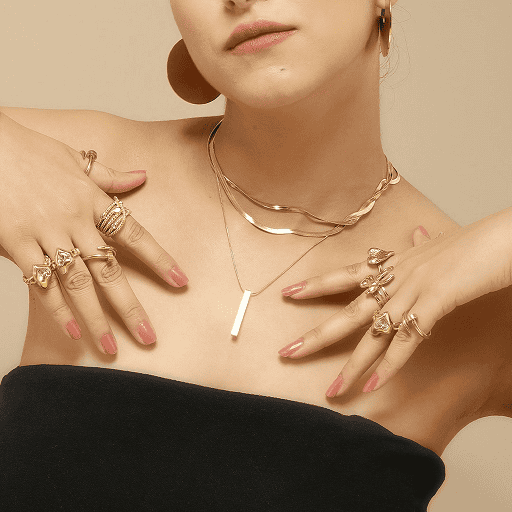
Jewelry
- Jewelry Compositing
- Retouching
- Color Grading
- Shadow Masking
- Background Removal

Real Estate
- Image Cropping
- Background Replacement
- HDR Processing
- Virtual Staging
- Photo Retouching

Retails
- Product Retouching
- Color Correction
- Background Removal
- Image Compositing
- Batch Editing
Work with us in 3 easy steps

Step 1
Upload Your Images
Submit 3 photo or 1 video (max 50MB) through our secure platform. Share your editing requirements, and we'll take it from there!

Step 2
Our Experts Get to Work
Sit back while our skilled editors enhance, retouch, and refine your visuals with precision and care.

Step 3
Get Your Newly Retouched Files
Receive your professionally edited files, ready to elevate your brand, campaign, or project!
Pricing for Photo & Video Editing Services
Discover Our Affordable Editing Services
Pricing starts at just $0.49 per image for photo editing and $20.65 per video for video editing.
BrochureGet Started with Innovature Studio
Contact us to discuss your photo and video editing needs or request a custom quote.
Contact UsFrequently Asked Questions
Can You Edit Large Volumes of Photos for Retail or E-commerce?
Yes, we use Adobe Lightroom to batch-process large sets of photos efficiently, ensuring consistency in color and quality for retail inventory or e-commerce product listings, saving time while maintaining high standards. For bulk order pricing and timelines, check our pricing guide or contact us at retouch.ops@innovatureinc.com for a custom quote.
How Do You Ensure Color Accuracy in Jewelry and Beauty Product Photos?
We rely on Capture One for precise color grading in RAW files and Adobe Photoshop for fine-tuned adjustments, ensuring gemstones, metals, and beauty products look vibrant and true-to-life for marketing and sales.
Do You Offer Motion Graphics or Effects for Videos?
Absolutely. We use Adobe After Effects to create motion graphics, visual effects, and animations, such as intros or animated ads, ideal for brands and content creators looking to enhance their video content.
Can Innovature Studio Handle Real Estate Photo Edits for Virtual Staging?
Yes, we use Adobe Photoshop to add furniture and decor to empty rooms for virtual staging, and Lightroom to enhance lighting and colors, making properties more appealing for listings and virtual tours.
What Makes Davinci Resolve a Good Choice for Your Video Editing?
DaVinci Resolve is our go-to for advanced color grading and editing, offering a robust free version. Its tools help us achieve cinematic quality for music videos, films, or marketing content, especially for vibrant visuals.